

A forecast is valuable when it helps someone make a better decision in time to act. That makes choosing predictive analytics software a workflow decision as much as a modeling decision. This guide compares twelve platforms, explains where different approaches fit, and sets out a practical way to evaluate them with your own data. The shortlist is an editorial starting point, not a benchmark ranking or a promise that a particular product will deliver the same result in every business.
How predictive analytics turns information into a usable forecast
Predictive analytics tools estimate the probability or value of a future outcome from historical patterns, usually as a number attached to a record: churn likelihood, next week's SKU volume, or default risk.
Turning historical records into a prediction
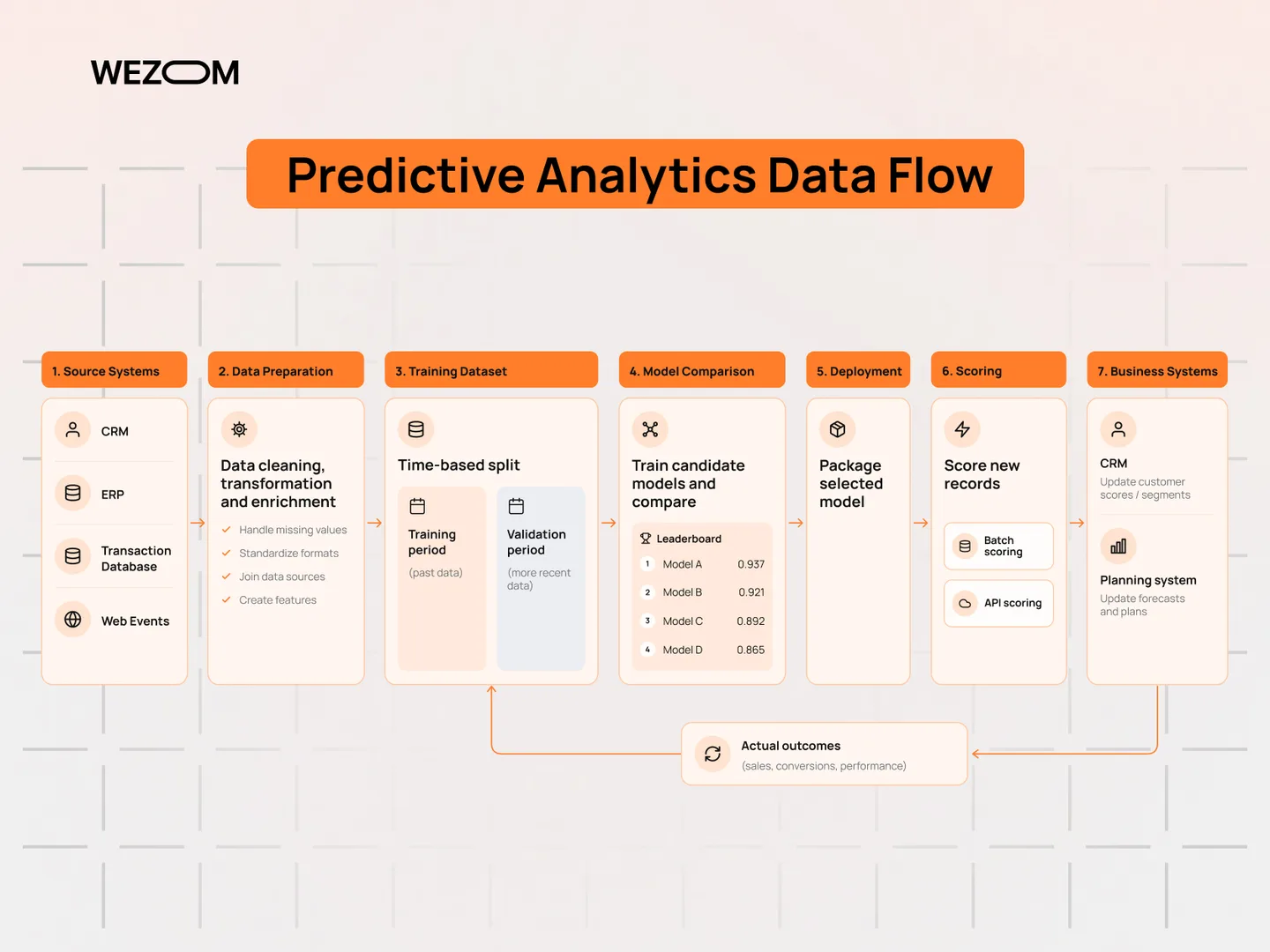
Describe the prediction before comparing products. Specify the unit being scored, the information available at that moment, the period being predicted, and the action that follows. A system that predicts a customer will leave next month needs a different evaluation from one that estimates tomorrow's product demand. Both also need a feedback route that connects predictions with what eventually happened.
Statistical models, machine learning, and AI
A predictive workflow can use statistical methods, machine-learning algorithms, or a combination. The method should fit the outcome and available evidence. Start with a simple baseline and make more complexity justify itself through a useful, repeatable evaluation.
Reporting, predictions, and recommended actions
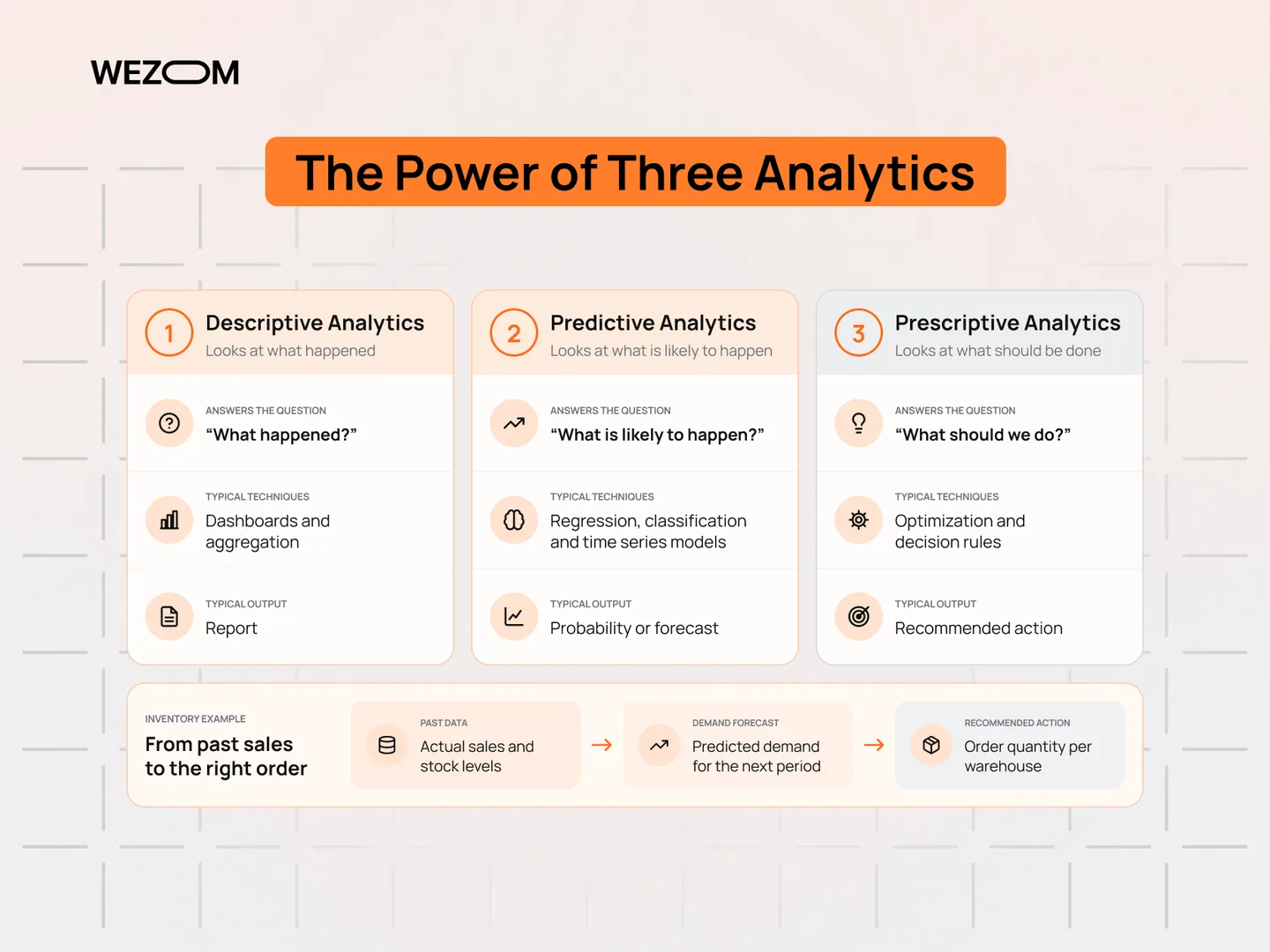
Reporting explains recorded activity. Predictive work estimates an outcome that is not yet known. Decision optimization goes a step further by comparing possible actions against constraints and objectives. These capabilities can sit in the same product, but they should not be treated as interchangeable during procurement.
For example, an inventory dashboard can show past sales, a forecast can estimate demand, and a planning process can decide what to order within a storage or budget limit. Define which part is missing in the existing workflow. Buying an advanced modeling platform will not resolve an unclear decision process or inconsistent source records on its own.
Where organizations put predictions to work
Common starting points include planning demand, prioritizing retention work, reviewing suspicious activity, and scheduling inspections. For each one, identify the person who acts and the result that can be checked later. A score without an operational owner rarely improves a process.
How this shortlist was evaluated
The selection covers visual analytics products, enterprise AI platforms, and managed cloud environments. We considered the workflow each product supports: preparing data, comparing models, deploying predictions, reviewing results, and maintaining the service. Product capabilities and commercial terms change, so verify the current documentation and run a representative pilot before choosing a platform.
Predictive capability and a representative evaluation
Test the outcome that matters to the actual process. Compare candidates with the same preparation rules and evaluation period, and include a simple baseline. A generic accuracy figure is not a substitute for that comparison.
Usability, visual workflows, and automated training
Match the environment to the people who will maintain it. Ask another team member to reproduce an experiment and inspect a transformation. Automation should reduce repetitive work while leaving the assumptions visible.
Connections, scale, and deployment requirements
Use the real data sources and the intended delivery pattern in the pilot. Confirm how preparation, scoring, and application integration will operate together rather than judging only the model-building interface.
Explainability, permissions, and review
Identify who can access the records, approve changes, and investigate results. The assessment should demonstrate those responsibilities with the intended roles, including the controls required for sensitive information.
Commercial terms and the complete operating cost
Request current terms for realistic usage. Include implementation, training, infrastructure, support, and the work your team must operate outside the product. Document the assumptions so proposals can be compared fairly.
Twelve predictive analytics platforms to evaluate
The list starts with enterprise AutoML and statistical suites, moves through cloud machine learning platforms and the lakehouse, and ends with visual and low-code options. The order reflects category, not an overall score.
1. DataRobot: enterprise modeling and model operations
DataRobot brings predictive AI into a wider enterprise platform that includes governance and operational capabilities. It is worth evaluating when the requirement extends beyond training a model to maintaining it within a shared organizational process. Start with a representative use case and include the reviewers and operators who will inherit it. During a pilot, follow a candidate from its experiment record into the intended deployment. Then ask a second person to investigate an unexpected result. The value of the platform depends on whether your team can understand and maintain that complete workflow, rather than on the quality of a demonstration alone.
2. SAS Viya: analytical depth within a governed environment
SAS Viya combines analytics and AI capabilities across data exploration, modeling, and deployment. It is a relevant candidate for organizations with established analytical practices or a requirement to bring several kinds of analysis into one operating environment. Evaluate the specific forecasting or modeling methods your use case needs. Bring existing analysts into the assessment and use a real preparation workflow. Ask them to explain the result and reproduce the process, then review how it would be scheduled or delivered to another team. Include integration, administration, and training in the comparison instead of considering the analytical interface in isolation.
3. IBM SPSS Modeler: visual predictive workflows
IBM SPSS Modeler provides a visual environment for data preparation and predictive modeling. Its workflow approach can help teams make the sequence of analytical steps visible and repeatable. That is useful when several people need to understand how source records become a model input or a delivered score. Test the complete process with the organization’s own data connections. Have someone other than the initial builder inspect a transformation, reproduce an experiment, and change an input safely. A visual canvas should make ownership clearer; it should not become a substitute for documented assumptions or a deployment plan.
4. Alteryx Designer: preparation and predictive analysis together
Alteryx Designer is a candidate when preparation and repeatable analytical workflows are central to the problem. Its predictive toolset includes R-based tools, so review the installation and runtime requirements of the particular components your team intends to use. Avoid assuming every environment includes the same predictive configuration. Use the pilot to connect raw records, preparation, a predictive step, and a usable output. Pay attention to what happens when a source format changes or a scheduled workflow fails. The strongest fit is a process that the responsible analysts can inspect and maintain without relying on undocumented manual steps.
5. H2O.ai: automated model exploration with an operating plan
H2O AutoML automates the training and comparison of multiple candidate models within user-defined constraints. It can be useful for exploring a baseline and reducing repetitive experimentation. It still requires a sound definition of the outcome, appropriate preparation, and an evaluation that reflects how the prediction will be used. Keep the selected model’s lifecycle in scope. The team should understand how an experiment is reproduced, how a model is packaged for the intended application, and who investigates changing results. Automated training can speed one stage of the work; it does not make the surrounding service operate itself.
6. Dataiku: collaboration across visual and code-based work
Dataiku combines visual workflows, code-based development, and model operations in a shared environment. It is worth considering when analysts, developers, and reviewers need to contribute to the same project. The pilot should demonstrate the handoff between those roles rather than focusing on the experience of a single builder. Follow a dataset through preparation, a model experiment, review, and delivery. Ask how permissions and changes are recorded, and how an operator investigates a failed run. Evaluate the connections to existing systems and the responsibilities that remain outside the platform before treating collaboration features as a completed operating model.
7. Azure Machine Learning: managed ML within Azure
Azure Machine Learning supports training, deployment, and machine-learning operations within Microsoft Azure. It can be a practical candidate when the organization already operates its data and application infrastructure there. That existing environment is a starting advantage to test, rather than a reason to skip a comparison. Build a small path from approved data access to a deployed prediction. Include the identity rules, configuration, and support procedures that a production service needs. Have the platform and application teams review the same implementation so that the ownership of infrastructure, model changes, and user-facing failures is clear.
8. Google Cloud ML: the Vertex AI product family
Teams may know Google Cloud’s managed machine-learning capabilities through the Vertex AI name. The current machine-learning documentation is presented under Gemini Enterprise Agent Platform, so verify the current product names and capabilities when preparing a proposal. The relevant question is how the documented training and serving workflow fits the application. Use existing data and application requirements to shape the assessment. Follow the model into its intended batch or request-time use, then examine permissions, output handling, and operational visibility. Confirm what can be exported or replaced later so that a cloud choice remains an informed architecture decision.
9. Amazon SageMaker AI: model development and hosting on AWS
Amazon SageMaker AI provides managed capabilities for building, training, and deploying models on AWS. It supports an environment in which developers can bring their own frameworks and algorithms as well as use managed capabilities. Evaluate it against the team’s existing AWS architecture and operational practices. Take a representative experiment through to the endpoint or batch job the business actually needs. Measure the complete production path, including data preparation and application integration. Identify the owners of permissions, runtime configuration, monitoring, and model updates before treating a successful training run as a production-ready feature.
10. Databricks: shared data and machine-learning workflows
Databricks brings data preparation, model development, experiment tracking, and model serving into an integrated platform. It is particularly worth evaluating where data engineering and machine-learning work need a shared process. Use the pilot to examine the relationship between prepared data, a model version, and its deployed result. Ask a second team member to trace an unexpected score back to the relevant inputs and experiment. Review how access and changes are controlled across the workflow. An integrated environment is most useful when it reduces operational ambiguity, rather than simply placing more tools behind the same sign-in.
11. Rapidminer AI Studio: visual data science with room for code
Rapidminer AI Studio, within Siemens’ Rapidminer offering, combines a visual workflow editor with support for code-based analytical work. It can be relevant when domain experts and developers need to collaborate without choosing between a visual canvas and a fully custom implementation. Confirm the current product and deployment arrangements with the vendor. Have both groups take part in the pilot. Use a realistic data connection, inspect the preparation steps, and follow the resulting model into its intended deployment. The assessment should show whether collaboration remains understandable when a workflow needs an unusual transformation or a production change.
12. Pecan AI: predictions delivered into business workflows
Pecan AI positions its predictive workflows around business use cases such as churn, demand, and revenue. It is worth evaluating when an operational team wants a usable prediction connected to the tools in which it already works. Define the outcome and intervention before judging the convenience of the interface. Use the pilot to inspect the input records, validation process, and delivery of results. Ask the business owner to demonstrate the action that follows a score and how its outcome will be captured. A forecast is useful because it improves a decision, not because another dashboard is available.
Compare the shortlist beyond the product demonstration
These products appear in different kinds of analytics environments, so compare their fit rather than assuming they are direct substitutes. The descriptions summarize their published positioning. The pilot questions are Flovyse's suggested checks, not claims that a product lacks the capability being examined.
A comparison of workflows and deployment needs
| Platform | Predictive strengths | Deployment |
|---|---|---|
| DataRobot | Predictive modeling with enterprise lifecycle and governance capabilities | Review vendor hosting options against the required operating model |
| SAS Viya | Statistical analysis, forecasting, and analytical decision workflows | Confirm the supported installation and infrastructure arrangement |
| IBM SPSS Modeler | Visual preparation and predictive modeling | Confirm the supported deployment and application integration |
| Alteryx Designer | Preparation workflows and an R-based predictive toolset | Review runtime dependencies, scheduling, and delivery of results |
| H2O.ai / H2O AutoML | Automated candidate-model training and comparison | Define how the selected model will be packaged and served |
| Dataiku | Shared visual and code-based modeling with operations | Review the installation and required batch or API delivery |
| Azure Machine Learning | Managed training, deployment, and MLOps | Azure cloud services within the organization’s configured environment |
| Google Cloud ML | Managed model-development and serving capabilities | Google Cloud services; verify current product configuration |
| Amazon SageMaker AI | Managed building, training, and model hosting | AWS services with the required endpoint or batch workflow |
| Databricks | Integrated data preparation, experiment tracking, and serving | Databricks platform with the required data and serving configuration |
| Rapidminer AI Studio | Visual data science with code-based development options | Vendor-documented cloud, on-premises, or hybrid arrangements |
| Pecan AI | Business-focused predictive workflows | Delivery of predictions into connected business systems |
Licensing, usage charges, and continuing expenses
Compare commercial proposals using the same operating assumptions. Include licenses, compute, data movement, implementation, training, support, and the engineering work left outside the product. Ask what happens when a model is retired or a dataset must move elsewhere. Export formats and operating responsibilities are easier to review before a contract becomes a long-term dependency.
Match the environment to your team and organization
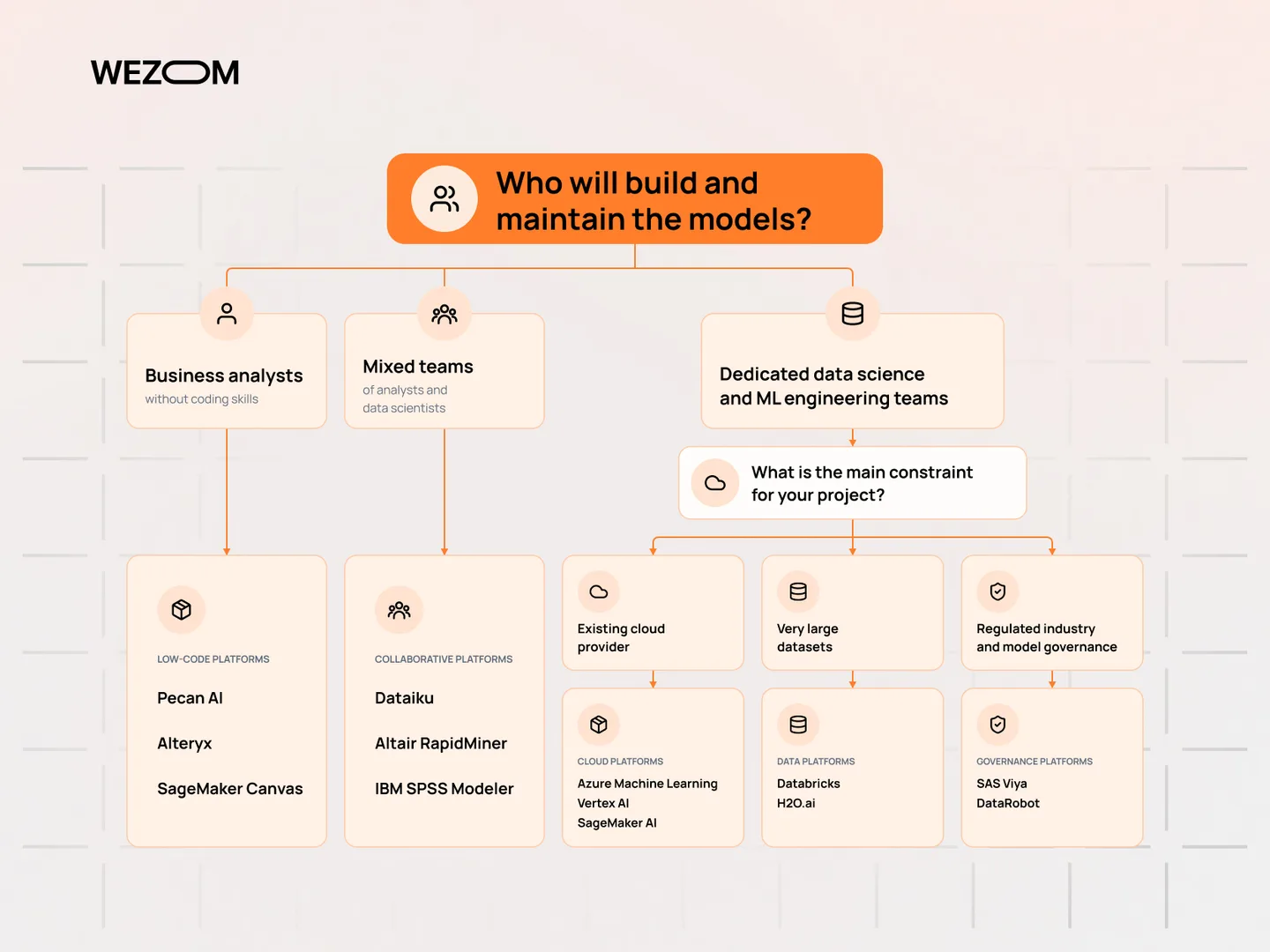
A cloud platform may fit a team already operating in that ecosystem. A visual environment may be more accessible to analysts who maintain preparation workflows. A business-focused product may help a specific operational team adopt predictions. These are evaluation hypotheses, not reasons to skip testing with the organization's own data and users.
Compare automation, forecasting, and model operations
Do not assume a broad platform provides the same depth for every task. Demonstrate the particular forecast, experiment process, and monitoring requirement the project needs. Review the resulting workflow with both the analytical and operational owners.
Choose a platform around the decision it needs to improve
Choose a first process where an owner can compare the prediction with a useful baseline and act on the result. Avoid launching a large catalog of scores that no one has time to review. For sensitive decisions, identify the required human review, data permissions, and specialist oversight before selecting a model or deployment pattern.
Sales planning and lead prioritization
Agree what is being forecast, when the sales team will use it, and how actual outcomes are recorded. Lead scoring also needs a clear action and feedback process; a ranking alone does not establish that the team can use it.
Customer retention and longer-term value
Define churn and the period in which an intervention can help. Evaluate whether the records available at prediction time support the question, and track what happens after the operational team acts on the result.
Demand planning and inventory decisions
Choose a forecast horizon that fits the ordering process. Include unusual periods and changes to product availability in the evaluation. The decision also needs constraints such as storage or purchasing capacity that a forecast by itself does not resolve.
Financial-risk and suspicious-activity review
Evaluate missed cases and unnecessary referrals alongside the capacity of the investigation team. Identify the human review and specialist oversight the workflow requires before automating a sensitive decision.
Maintenance and connected equipment
Connect observations to confirmed inspections and faults. A useful pilot assesses the cost of unnecessary work as well as missed problems, and demonstrates how the maintenance team receives and closes an alert.
Healthcare-related forecasting and risk review
Use appropriate clinical, privacy, and governance expertise to define the task and evaluate the result. Keep the model’s proposed role explicit, including who reviews outputs and which decisions remain with qualified people.
Understand the extra work behind live predictions
A prediction must reach its user while there is still time to act. Choose the delivery pattern around that deadline, then test the complete journey from an incoming event to an operational decision.
Scheduled forecasts and request-time scoring
Batch scoring can be appropriate when decisions are made on a schedule. An application-time prediction is useful when the result must respond to the current request. Streaming adds another pattern: incoming events update information or trigger scoring continuously. Choose the simplest approach that meets the decision's timing requirements.
Events, prepared features, and the inference endpoint
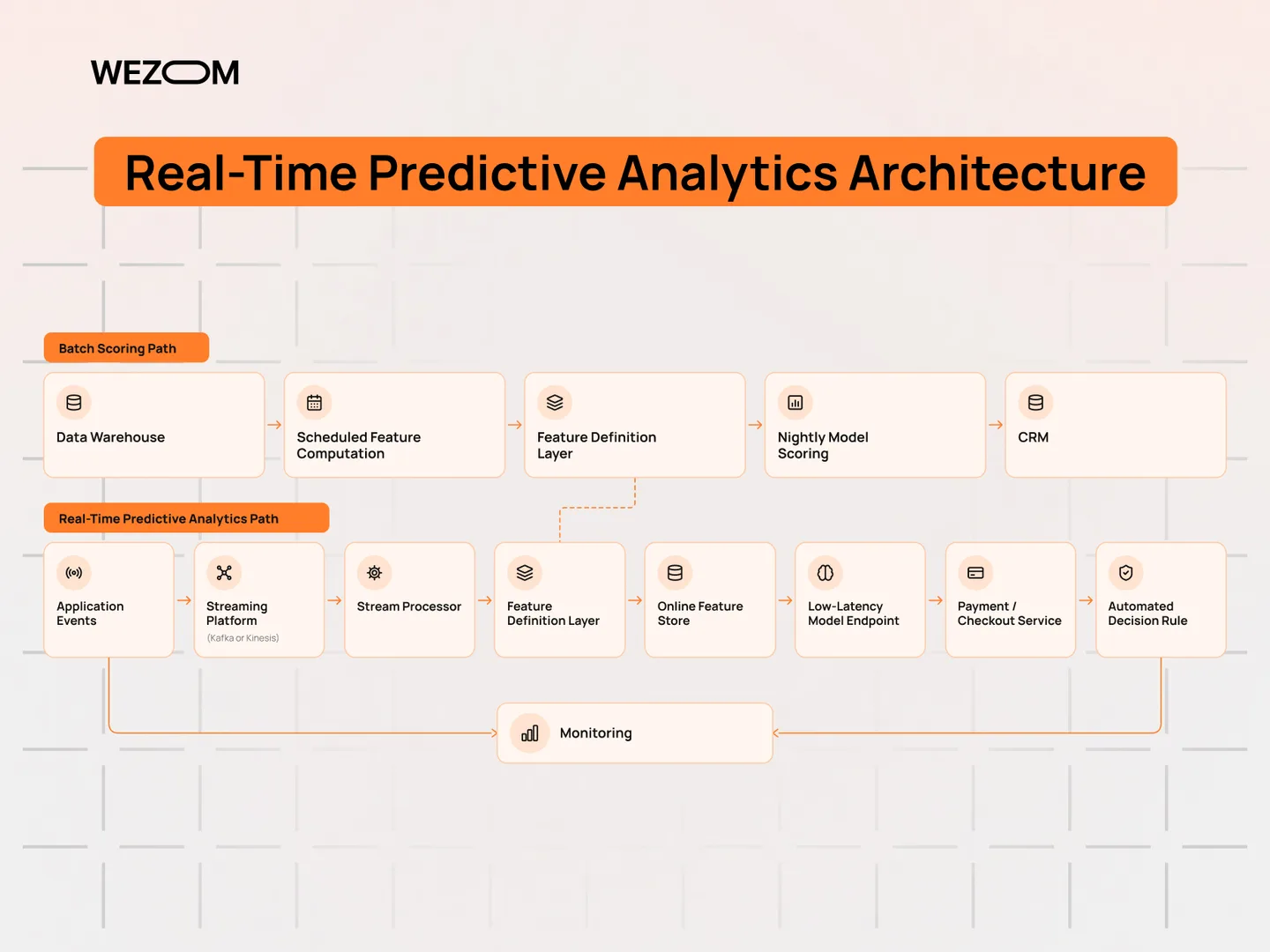
For a live service, include input freshness, response deadlines, fallback behavior, and the ownership of failed requests in the pilot. A fast model is not enough if the features arrive late or the application cannot recover when the endpoint is unavailable. Measure the complete path from source event to usable result rather than timing only the model's calculation.
Evaluate the platform’s complete serving path
Test data freshness, response deadlines, monitoring, and failure behavior together. Review how an earlier model or a simpler process can be used when the prediction service is unavailable. A low inference time is only one part of that requirement.
Where a timely prediction changes the action
Request-time scoring can be useful when an application needs a result before it continues. A scheduled process may be sufficient for tomorrow’s planning meeting. Let the actual decision deadline justify the delivery pattern and its operating cost.
Compare open-source, visual, and enterprise approaches
Compare the complete operating workflow, not just the model-building tool. A library, a visual workspace, and a managed platform leave different responsibilities with the team that supports the service.
Libraries and frameworks for a code-based workflow
Libraries such as scikit-learn and XGBoost, and automated training tools such as H2O AutoML, can support a code-based predictive workflow. They provide a different layer of the system from a managed enterprise platform. The application team still needs to decide how datasets, experiments, deployment, permissions, and monitoring are maintained.
Visual and assisted tools for analytical teams
A visual environment can make preparation and modeling steps easier to inspect. Include the people who will maintain those steps in the assessment, and confirm how a workflow is deployed and supported after its first successful run.
Cloud, on-premises, and hybrid operating models
Review data access, deployment controls, and support responsibilities for the intended environment. Treat the placement of each component as an operating decision, including the movement of data and the procedures needed when a connection fails.
When a smaller toolset is enough
A commercial product can supply some of that surrounding workflow, but it does not remove responsibility for the decision or data. Compare a realistic operating plan for each option. A small team with strong existing infrastructure may make a different choice from analysts who need a shared visual environment and an established approval process.
Choose with evidence from a focused proof of concept
Use one representative decision to test the shortlist. Agree the evidence, the owner, and the finish line before the demonstration, then compare each candidate under the same working conditions.
Define the prediction and the measure of success
Write down the entity, time horizon, available inputs, responsible owner, and resulting action. Agree the baseline process and the evaluation criteria before comparing product outputs.
Assess the available records and connections
Inspect missing fields, changing definitions, and the ability to join the required sources. Confirm that the outcome can eventually be observed and that the pilot has permission to use the records it needs.
Match the workflow to the team’s capabilities
Ask the intended users to reproduce a preparation step, an experiment, and an investigation. Include the support and platform teams where they will own part of the deployed service.
Review accuracy, explanations, and maintenance
Judge the result against the real costs of wrong predictions. Ask how model and input changes are reviewed, what explanations users need, and who can pause a service that stops meeting its requirements.
Compare the complete cost of operating each option
Use consistent assumptions for infrastructure, commercial terms, training, implementation, and support. Include the work left outside each product rather than comparing a software subscription with a custom project in isolation.
Give the proof of concept a practical finish line
Deliver a usable result to a limited audience and have someone independently reproduce the experiment. The outcome should be an informed decision about fit and ownership, not simply a finished demonstration.
Implement the workflow in six manageable stages
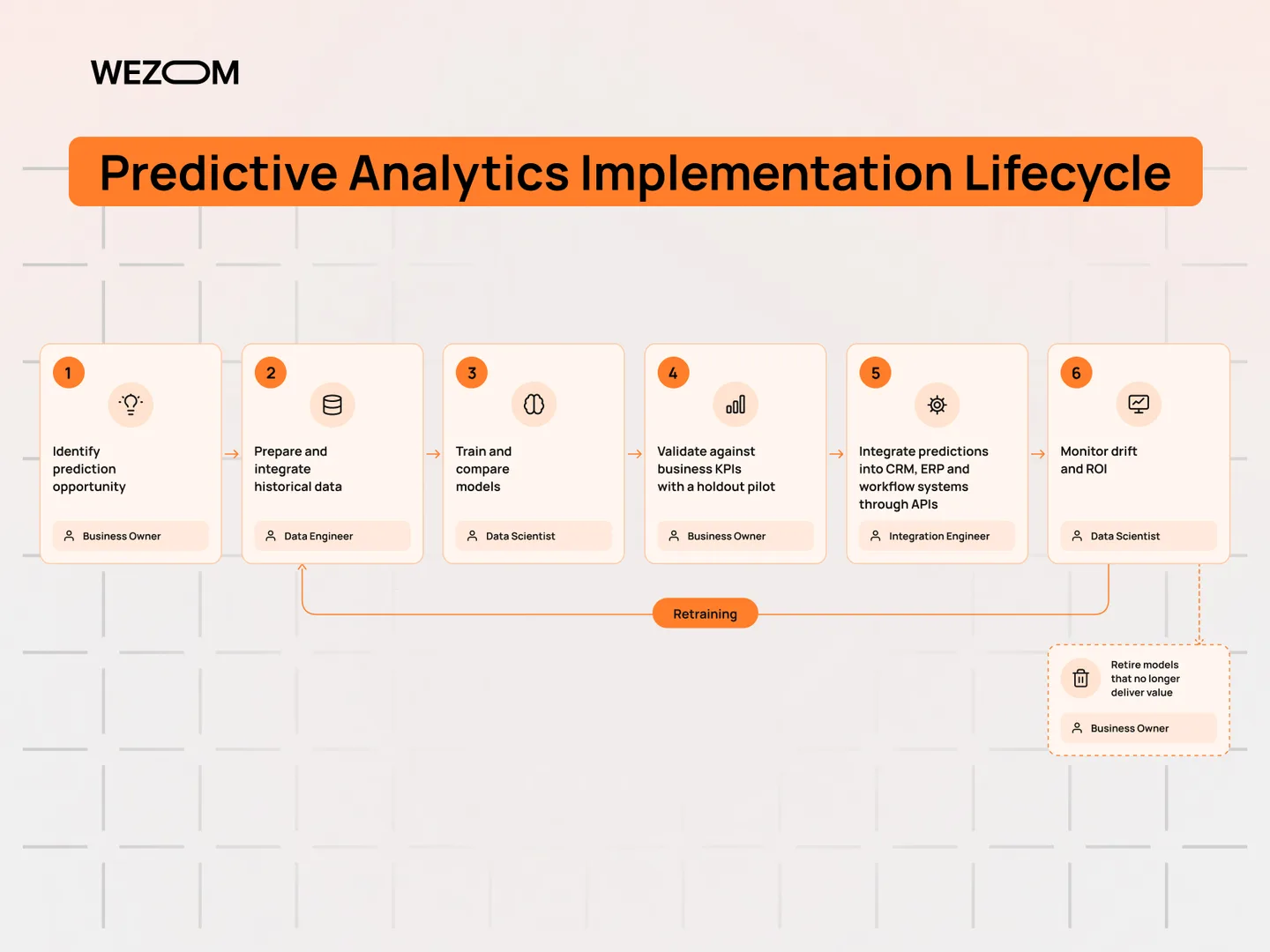
Choosing software starts the implementation. A useful rollout also connects trusted records, reproducible experiments, operational delivery, and a team responsible for what happens after a prediction.
1. Identify one decision worth improving
Choose a process with an accountable owner and an observable outcome. Define the initial audience and the practical action that follows a prediction before expanding the feature list.
2. Prepare and connect the historical records
Document source definitions and preparation rules so that another person can reproduce the dataset. Check that each input would have been available at the point the prediction is meant to represent.
3. Train and compare suitable candidates
Start with a straightforward baseline and record the experiment configuration. Compare alternatives using the same objective and data split instead of selecting a model from an isolated headline score.
4. Validate the result in business terms
Review errors with the people responsible for the process. Assess whether a prediction arrives in time to help, and whether the proposed intervention can be carried out within the team’s capacity.
5. Deliver predictions into the operational process
Begin with one process and a limited audience. Confirm that the required data can be accessed consistently, then build a reproducible preparation and training workflow. Agree evaluation criteria before comparing results, and deliver the chosen output into a tool the operational team already uses where possible.
6. Monitor the service and capture outcomes
Assign an owner for the service before broadening access. Document how it is monitored, how a previous version is restored, how feedback is collected, and when a model should be reconsidered. Track whether the new workflow improves the intended business decision; a deployed endpoint is a technical milestone rather than proof of business value.
Evaluate newer capabilities without losing the evidence
Natural-language interfaces and AI assistance
Natural-language interfaces and automated experiment tooling can make analytical work easier to start. They can also hide important assumptions behind a convenient answer. Ask how generated queries, transformations, and explanations are reviewed, and whether the team can reproduce the underlying calculation without relying on a conversation history.
Automated experimentation and feature preparation
Use assistance to reduce repetitive work while keeping transformations and evaluation choices reviewable. Confirm that an authorized team member can reproduce the result without relying on an unrecorded sequence of prompts.
Predictions closer to the moment of action
Evaluate streaming or request-time delivery where it improves a concrete workflow. Include freshness, failure handling, and operational ownership so that a faster result remains a dependable one.
Explanations, governance, and change records
Treat new capabilities as additions to a disciplined process. Keep a record of data versions, model changes, evaluation results, and operational decisions. An explanation should help a person understand a prediction, while the original records and approved model remain the evidence for what the system actually did.
Prediction inside existing business applications
Embedding an output into a CRM, ERP, or planning tool can reduce the effort of using it. Keep the action, feedback, and source of the result clear rather than adding a score that no one is responsible for reviewing.
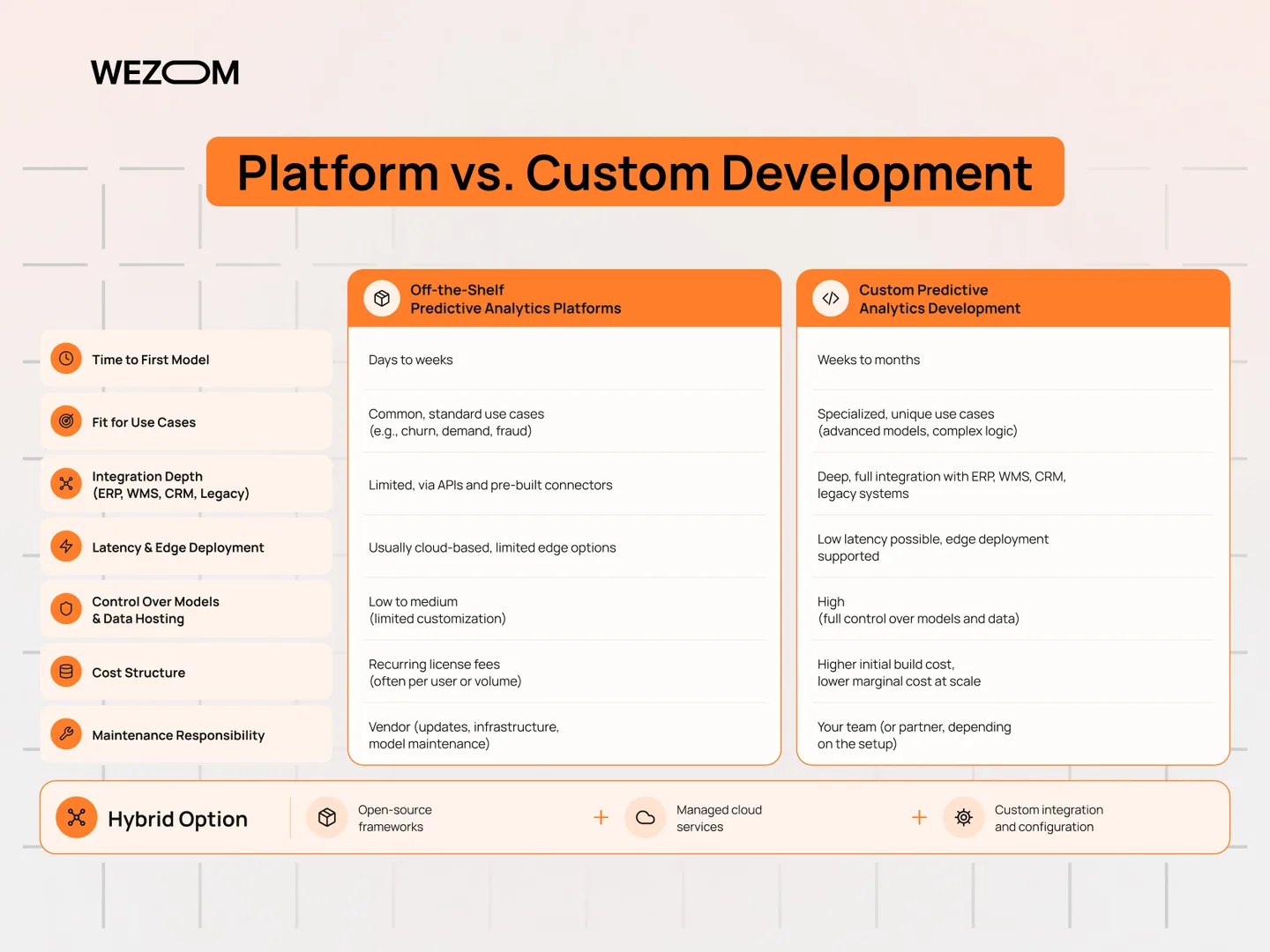
Decide where a product fits and where custom work is needed
When a ready-made platform covers the requirement
A product can be a useful foundation when its data connections, analytical workflow, and deployment model match the intended process. Demonstrate the difficult part of the journey before assuming the remaining integration is routine.
Where specialized workflows expose limitations
Identify the unusual data rules, user actions, or operating constraints the project needs. Ask how those requirements are implemented, tested, and supported rather than relying on a general promise of flexibility.
Combine managed capabilities with focused custom development
A ready-made platform can provide a useful foundation when its workflows match the requirement. Custom development can address a specialized decision, an unusual integration, or a delivery channel that the product does not cover. In many projects the practical answer is a combination: managed capabilities connected to a focused application and operating process.
Compare ownership, change, and value over time
Compare the alternatives against the same acceptance criteria and ownership plan. Identify which components can be changed independently, how data can be exported, and who will maintain each part after launch. The right choice should make the first useful release achievable while keeping future changes understandable and supportable.
FAQ
Which kind of predictive tool should a smaller business evaluate first?
Start with one decision and the people who will maintain it. A focused business product, a visual workflow, or an existing cloud environment may each be appropriate. Use a small pilot to compare the complete work rather than choosing from company size alone.
Can a useful prediction be built without historical outcomes?
First establish what the available records can support. Some approaches can use additional data or a different task definition, but a system still needs evidence for evaluating whether its predictions are useful. Do not assume automation can replace missing business information.
What skills are needed to use these products?
The interface may be visual or code-based, but the team still needs to understand the outcome, data preparation, evaluation, and deployment. Assign operational and review responsibilities even when a product automates training.
Is there a minimum dataset size that guarantees accuracy?
No universal row count establishes a good result. Outcome frequency, data variation, preparation, and the evaluation design matter. Assess the actual records and compare with a simple baseline before drawing conclusions about the available evidence.
How does prediction differ from a business-intelligence report?
A report describes recorded activity. A predictive workflow estimates an unknown outcome and needs an evaluation against what later happens. The two can be used together, but they answer different questions.
Can predictions be connected to an existing CRM or ERP?
Review the product’s current connectors, APIs, and delivery options against the actual system. Test permissions, data freshness, failure handling, and how users will act on the result rather than assuming a named integration covers the complete workflow.
How often should a deployed model be retrained?
Define review triggers around changing inputs, observed results, and business requirements. Assign an owner who can decide whether to retrain, replace, pause, or retire the model. A calendar alone is not a complete maintenance policy.
When can a team judge whether the implementation provides value?
Agree the baseline, evaluation period, adoption measure, and operating costs before the pilot. The answer depends on when the outcome can be observed and whether people use the result. Deployment by itself does not establish a return.